
Geotargeting is a powerful way for med spas to focus their ads on local audiences, ensuring that marketing dollars are spent on people who are likely to visit. Why is this important? Most med spa patients won’t travel more than 15 miles for treatments like Botox or fillers, and 76% of local smartphone searches lead to an in-person visit within 24 hours. Without geotargeting, you risk wasting money on clicks from users outside your service area.
Here’s what you need to know:
- Set Up Radius Targeting: Use platforms like Google Ads or Meta Ads Manager to target users within a specific distance from your clinic.
- Optimize Ad Spend: Adjust bids for high-performing areas and reduce spending in low-conversion zones.
- Use Local Keywords: Combine treatment names with location modifiers (e.g., "Botox near me" or "lip filler [City] price").
- Leverage Ad Extensions: Add location details, clickable phone numbers, and links to high-conversion pages.
- Track Results: Use tools like geographic reports to analyze performance by region and refine your targeting.
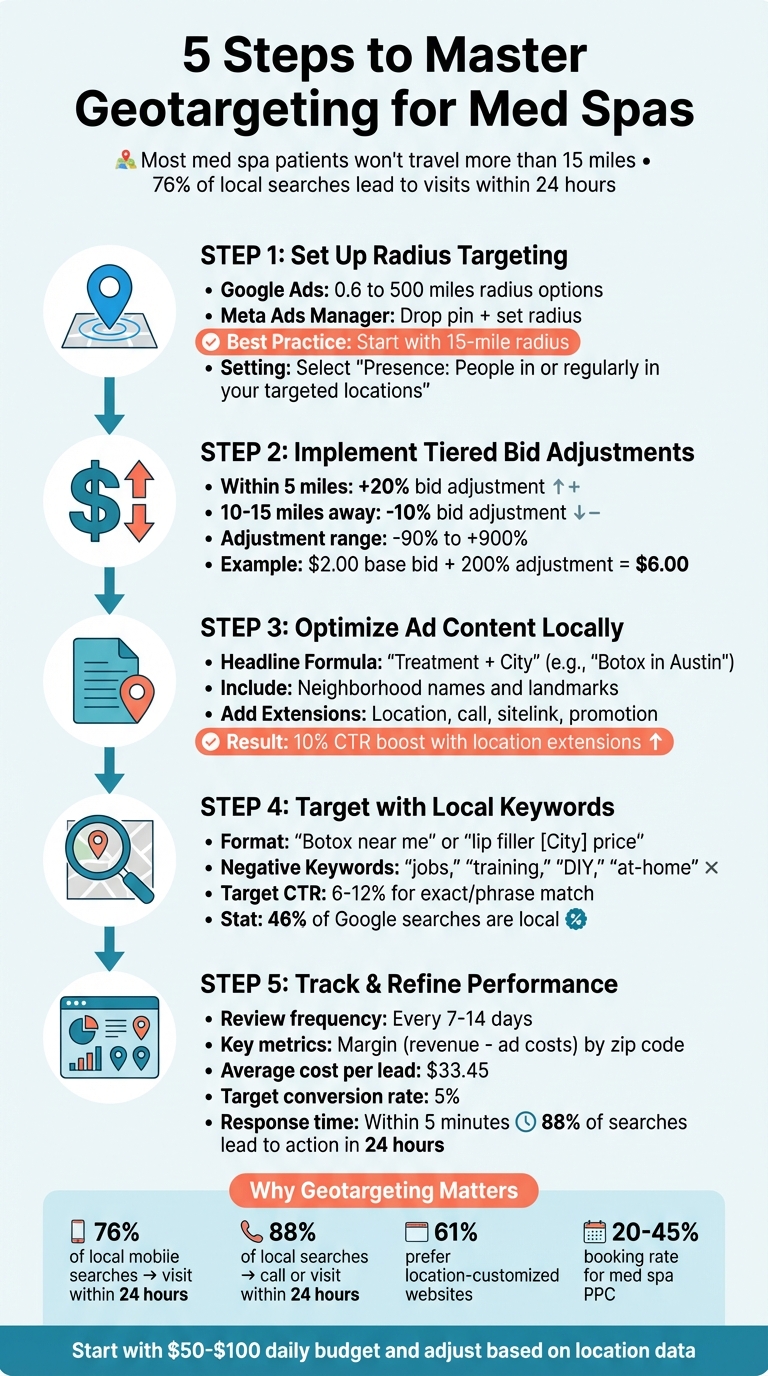
Med Spa Geotargeting Setup Guide: 5 Steps to Optimize Local Ad Campaigns
How to Set Up Geotargeting in Paid Ads
To start using geotargeting effectively, choose the right advertising platform and define your service area clearly. For Google Ads, head to the Locations tab, select Radius targeting, and input your med spa's physical address. Google allows you to set a radius between 0.6 miles (1 km) and 500 miles. For best results, stick with smaller ranges to focus on local audiences.
On Facebook and Instagram, geotargeting is managed through Meta Ads Manager. Simply drop a pin on your location and set a radius. You can also target specific areas like countries, states, cities, ZIP codes, or neighborhoods. To ensure your ads reach the right people, select the "People living in or recently in this location" option under location behavior settings. This helps focus on residents and frequent visitors rather than one-time passersby.
Now, let’s dive into setting up radius targeting for more precise local outreach.
Setting Up Radius Targeting
Radius targeting, also known as proximity targeting, ensures your ads are shown only to users within a specific distance from your clinic. This is especially important for med spas since most patients aren’t willing to travel more than 15 miles for routine treatments like Botox or fillers. When setting your radius in Google Ads, use the map preview to confirm that the area covers key neighborhoods and business hubs where your target audience lives or works, while avoiding regions too far to be practical.
In your campaign settings, select "Presence: People in or regularly in your targeted locations" instead of "Presence or Interest." This setting ensures your ads are delivered to people physically located in the area, helping you avoid wasted ad spend.
Using Location Bid Adjustments
Location bid adjustments let you tweak your bids by a percentage based on how well specific areas perform. Adjustments can range from –90% to +900%, meaning you can lower a bid to just 10% of its original value or increase it up to ten times. For example, you might apply a +20% adjustment for ZIP codes within 5 miles and a –10% adjustment for areas 10–15 miles away to maximize conversions. If your base bid is $2.00 and you apply a +200% adjustment in a high-performing area, your bid increases to $6.00.
Start with Manual CPC bidding to maintain control over these adjustments before switching to automated strategies. Regularly review "Matched locations" reports to identify high-conversion areas and fine-tune your bids. For locations with high impressions but few conversions, a –90% adjustment can significantly reduce spending without entirely removing the area from your campaign.
Creating Ad Content for Local Audiences
When it comes to local advertising, tapping into geotargeting basics can significantly boost patient engagement. A great starting point is crafting ad copy that speaks directly to your local audience. Try using the "Treatment + City" formula in your first headline. For example, "Morpheus8 in Scottsdale" or "Botox in Austin." Follow it up with a specific benefit or offer in the second headline, like "Free Consult", and wrap it up with localized social proof in the third headline, such as "Voted #1 Med Spa in [City]" .
To build instant trust, mention specific neighborhoods or well-known landmarks in your ads. Even customizing your URL - like yourmedspa.com/botox-scottsdale - can signal local relevance. Why is this important? Because 46% of all Google searches are looking for local information, and 76% of mobile searches with local intent result in a physical visit within 24 hours . Make it crystal clear that you’re the local choice. And don’t forget about your landing page - if someone clicks on an ad for "Botox in Austin", they should land on a page that’s all about Botox services in Austin, complete with contact details.
To avoid wasting ad spend, use negative keywords like "jobs", "training", "DIY", or "at-home" to filter out irrelevant traffic.
Adding Local Keywords
Local keywords are a game changer. They make your ads more relevant, improve your Quality Score, and even lower your cost per click. Combine service names with local modifiers like "Botox near me", "lip filler [City] price", or "best Morpheus8 injector [City]." These keyword combinations are perfect for capturing high-intent searches from potential patients who are ready to book. Susie Marino of WordStream emphasizes that regional terms can significantly boost quality scores.
Instead of generic phrases like "med spa", aim for outcome-focused local search terms. For instance, try "Botox near me with natural results" or "CoolSculpting [City] before and after." For med spas, a healthy Click-Through Rate (CTR) on Google Search for exact or phrase match ad groups usually falls between 6% and 12%. Including localized social proof in your headlines further builds credibility - 61% of smartphone users prefer websites that customize information to their location.
Once your keywords are set, you can amplify your ad’s impact with the right extensions.
Using Ad Extensions
Ad extensions are a fantastic way to expand your ad's visibility on search results pages without increasing your cost per click. Location extensions, for instance, display your physical address and the distance from the searcher. This data pulls directly from your Google Business Profile, so keeping that profile accurate and updated is essential. Adding location extensions can boost click-through rates by 10%.
Call extensions are another powerful tool, offering a direct click-to-call button for mobile users with high intent. Make sure to schedule these during business hours to maximize effectiveness. Research shows that consumers are 70% more likely to visit a business with a complete and accurate Google Business Profile.
You can also use sitelink extensions to guide users to specific high-conversion pages, like "Before & After Gallery", "Current Promotions", "Pricing", or "Online Booking." For promotions, promotion extensions are a great way to highlight deals or limited-time offers, such as "15% Off First Visit" or "New Patient Special: $99 Skin Assessment." These can create urgency and lower the barrier to booking.
With well-optimized ad content, you're setting the stage for better campaign results, which we’ll dive into in the next section on measuring performance.
Measuring and Improving Geotargeting Results
Once you've set up your geotargeting strategy, tracking its performance is the next crucial step. Monitoring your campaign's progress allows you to fine-tune your approach and maximize results. When your geotargeted ads are live, tools like Google Ads offer two key reports to guide your analysis: the Geographic Report, which evaluates how your targeted areas are performing, and the User Location Report, which shows where users were physically located when they clicked on your ad - even if those locations weren’t part of your original targeting settings. This distinction can reveal untapped high-performing areas you might not have considered.
To get the most out of this data, review performance at different levels - region, metro area, city, and zip code. Don’t just focus on clicks; instead, zero in on margin, which is the revenue generated from a location minus your ad costs. For example, a zip code might drive a lot of clicks but result in few actual bookings, while another area with fewer clicks might convert at a much higher rate. Export your geographic data to analyze ROI more effectively. Check these reports every 7–14 days to ensure you’re working with enough data for meaningful insights. This routine will help you identify trends and refine your targeting strategy.
Reading Location Reports
Location reports are essential for deciding where to allocate your advertising budget. These reports can highlight neighborhoods or regions that deliver strong results, as well as areas that drain your budget without meaningful returns. For example, you might find certain "no-show zones" where patients frequently book appointments but fail to appear. Pausing ad delivery in these areas can help you avoid wasting resources.
Additionally, use the Search Terms Report to fine-tune your keyword targeting. According to WordStream, "80% of consumers say they would like to receive location-based alerts from businesses". This means it’s critical to ensure your ads reach people who are not only interested but also capable of visiting your practice in person.
Once you’ve adjusted your bids and keywords based on performance, link these optimizations to your revenue outcomes to gauge their true impact.
Calculating ROI for Local Campaigns
To measure ROI for geotargeted campaigns, connect your ad performance directly to revenue. The formula is simple: (Return – Investment) / Investment. This calculation helps you understand the profit generated by each geographic area.
To make this process seamless, use a CRM that ties each patient’s details - such as name, zip code, ad source, and keyword - to their booking. Call tracking tools like CallRail can also help you attribute phone leads to specific campaigns. For med spas, the average cost per lead is $33.45, with a healthy conversion rate hovering around 5%. If a particular zip code shows a higher-than-average cost per lead and a lower-than-expected conversion rate, it’s a clear signal to adjust your targeting strategy.
Keep in mind that 76% of mobile searches with local intent result in a physical visit within 24 hours. To capture the full picture, your tracking should account for both online bookings and phone calls, ensuring no lead goes unnoticed.
sbb-itb-02f5876
Using Prospyr Marketing Tools for Geotargeting

Connect your refined geotargeting insights directly to your practice management system. This is where Prospyr plays a key role - it bridges the gap between your paid ads and patient bookings, giving you a clear picture of which local areas are generating actual revenue.
Prospyr’s lead capture and marketing automation tools work hand in hand to attract local patients. When someone clicks on your geotargeted ad, Prospyr automatically collects their information and tags it with details like the keyword, zip code, or campaign that brought them in. This kind of tracking is essential for pinpointing which neighborhoods are worth your advertising budget. Plus, this seamless integration lays the groundwork for nurturing leads and analyzing performance data effectively.
Automating Lead Capture and Follow-Up
Prospyr’s lead capture tools ensure that every geotargeted visitor is accounted for. When a potential patient fills out a form or begins the booking process, their details - including their location - are automatically added to your CRM. This eliminates the need for manual tracking and ties each lead directly to its source.
The marketing automation feature takes things a step further by enabling retargeting for local leads who visit your site but don’t book right away. For example, if someone from a high-value zip code browses your Botox page but leaves without scheduling, Prospyr can automatically send a follow-up email or SMS within hours. Considering that 88% of local searches lead to a phone call or visit within 24 hours, this timely follow-up can make all the difference in securing their attention.
You can also customize retargeting based on the specific treatment they showed interest in. If a visitor starts but doesn’t finish booking a lip filler appointment, Prospyr can send them a personalized message about that service, encouraging them to return.
Using Practice Analytics for Better Targeting
Building on earlier ROI insights, Prospyr’s practice analytics offer the data you need to fine-tune your geotargeting strategy. You can identify zip codes with the highest conversion rates and lowest booking costs. The platform tracks key metrics like click-through rates (CTR) and conversion rates by location, allowing you to adjust your bidding strategy in real time.
For instance, if your analytics reveal that patients from a specific neighborhood within 5 miles of your clinic convert at 8% - well above the typical 5% benchmark for med spa PPC campaigns - you might increase your bids by 20% for that area to attract more high-intent traffic. On the other hand, if a particular zip code generates clicks but few bookings, you can scale back or pause ads in that area to avoid wasting your budget.
Prospyr also provides demographic insights, such as age, income level, and treatment preferences. This data allows you to craft geotargeted ads that align with the characteristics of your ideal patients. For example, if the data shows that patients seeking premium treatments like microneedling or laser resurfacing typically come from higher-income neighborhoods, you can adjust your targeting and messaging to focus on those areas.
"Paid search isn't something you launch once and let run on autopilot. It's an ongoing patient acquisition system that requires consistent attention and optimization." - Margott Agency
Geotargeting Best Practices for Med Spas
Once you've set up your campaigns and tracking, it's time to fine-tune your geotargeting strategy to get the best results.
Start by targeting a 15-mile radius, as most patients are unlikely to travel farther for treatments. Set your campaigns to "Presence" targeting, which focuses on people who are physically in - or regularly present in - your selected area. This small adjustment helps you avoid wasting ad spend on clicks from people outside your service area.
Consider using tiered bid adjustments to optimize your budget. For example, increase bids by 20% for zip codes within 5 miles of your location, while scaling back spending in areas farther out. Also, filter out irrelevant traffic by adding negative keywords like “cheap,” “Groupon,” or “jobs”.
Make your ads feel local. Include neighborhood names, city references, or landmarks in your copy - ads with local references tend to see double the engagement compared to generic ones. Add location and call extensions to boost trust and make it easier for potential patients to connect with you.
Stay on top of performance by analyzing data at the zip code level using location reports. For instance, if certain zip codes exceed the typical 5% conversion rate for med spa PPC campaigns, shift more of your budget toward those high-performing areas. Tools like Prospyr’s practice analytics simplify this process by tying ad performance directly to bookings and revenue by location. This ensures you're putting your budget where it counts.
"For med spas, geography isn't just targeting - it's strategy." - ClinicGrower
Timing matters, too. Respond to inquiries within 5 minutes, as 88% of local searches lead to a call or visit within 24 hours, with booking rates between 20–45%. Start with a daily budget of $50–$100 and adjust based on the insights you gather from your location data.
FAQs
What’s the best way for med spas to set up radius targeting in their ads?
To configure radius targeting in Google Ads, navigate to your campaign’s Locations settings and select the Radius option. Enter your med spa’s address and specify the radius in miles, such as 5–10 miles. If necessary, you can exclude overlapping areas to refine your targeting. For improved performance, activate location extensions to ensure your ads are shown only to users within the designated area. This approach helps you concentrate on drawing in local patients efficiently.
Why should med spas use local keywords in their advertising campaigns?
Using local keywords in your med spa advertising is a smart way to reach nearby searchers who are actively looking for services like yours. These high-intent users are more likely to convert into paying customers, giving your ads a better chance to succeed.
When you focus on location-specific terms, you’re not just boosting click-through rates - you’re also drawing in more qualified leads. This means more potential patients walking through your doors and better overall engagement with your ads. It’s an effective way to stretch your advertising budget further and see a stronger return on investment (ROI).
How can med spas use location bid adjustments to improve ad performance?
Location bid adjustments are a smart way for med spas to make the most of their advertising budget. By raising bids in zip codes or neighborhoods that perform well and lowering them in areas that don’t, you can ensure your ads show up where they’ll have the biggest impact. This approach boosts ad visibility in the right places, leading to more clicks, visits, and patient conversions. Over time, this can improve your click-through rates (CTR) and increase your return on investment (ROI).
Focusing your budget on areas with high patient interest makes your campaigns more precise and effective, helping you attract local patients to your med spa with less wasted spend.