HIPAA Compliance for eSignatures: What Clinics Need to Know
Clinics must use HIPAA-compliant eSignatures with strong authentication, encryption, tamper-proof audit trails, and a BAA to avoid fines and protect patient trust.


Clinics using eSignatures for patient forms, consents, and telehealth agreements must ensure compliance with HIPAA to avoid fines and protect patient trust. Here's what you need to know:
- HIPAA Requirements: eSignatures must include strong user authentication, encryption, tamper-proof audit trails, and secure storage. A Business Associate Agreement (BAA) with vendors is mandatory.
- Legal Frameworks: The ESIGN Act and UETA make eSignatures legally valid, provided they meet HIPAA's data protection standards.
- Common Mistakes: Using non-compliant platforms, weak identity verification, and mixed paper-digital workflows can lead to penalties.
- Compliance Tips: Use healthcare-specific platforms, digitize workflows, train staff on HIPAA rules, and conduct regular risk assessments.
Failing to comply can result in fines up to $1.5 million per violation type annually, legal disputes, and loss of patient trust. A secure, HIPAA-compliant eSignature system safeguards sensitive data while improving clinic efficiency.
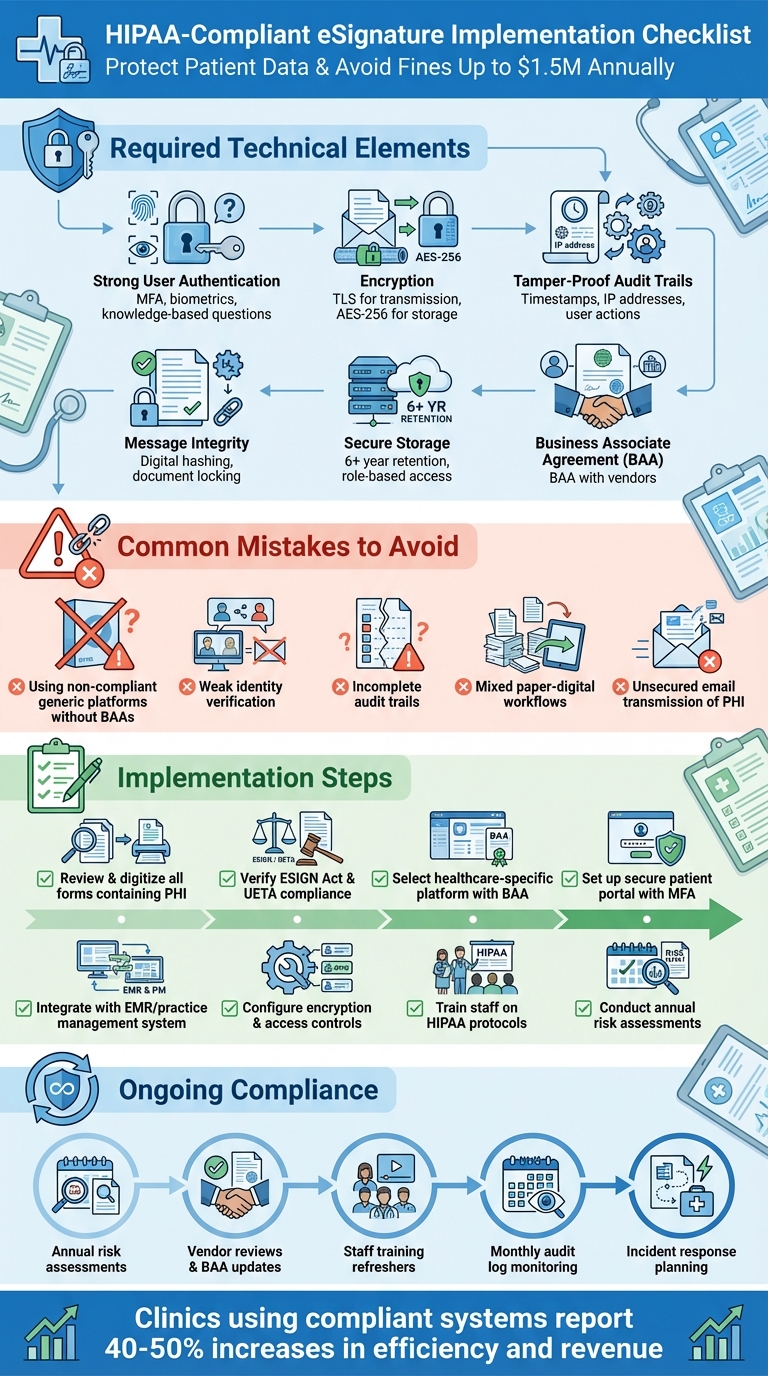
HIPAA-Compliant eSignature Implementation Checklist for Healthcare Clinics
HIPAA Requirements for eSignatures
Legal Frameworks That Govern eSignatures
When it comes to using eSignatures in healthcare settings, three key legal frameworks lay the groundwork. First, the HIPAA Privacy and Security Rules require that electronic signatures involving protected health information (PHI) maintain the confidentiality, integrity, and availability of that information. In practice, this means clinics need to implement robust security measures like authentication, encryption, and audit trails for all e-signed documents.
Next, the ESIGN Act gives eSignatures the same legal standing as handwritten ones, provided the signer intends to sign and consents to using electronic records. Similarly, the Uniform Electronic Transactions Act (UETA) - adopted by most states - ensures that electronic records and signatures are enforceable across various transactions, including those in healthcare. These laws work in tandem with HIPAA's security requirements, enabling clinics to confidently use eSignatures for tasks like consent forms, intake paperwork, and treatment authorizations.
HIPAA itself doesn’t mandate specific technologies, making it essential for clinics to choose systems that meet its security safeguards. Since the Department of Health and Human Services hasn’t issued detailed standards for HIPAA-compliant eSignatures, compliance boils down to implementing the right protections.
With this legal framework in place, a HIPAA-compliant eSignature system must include specific technical safeguards to meet the required standards.
Required Elements for HIPAA-Compliant eSignatures
- Strong User Authentication: Clinics must verify the identity of signers through methods like multi-factor authentication, biometrics, or knowledge-based questions. These should integrate seamlessly with the EMR system to ensure accuracy and security.
- Message Integrity and Tamper-Proofing: Signed documents must remain unaltered. Techniques like digital hashing or document locking can detect and display any unauthorized changes, ensuring the document’s integrity.
- Non-Repudiation: A comprehensive audit trail is critical. This should capture detailed data such as timestamps, IP addresses, and user actions, making it impossible for signers to later deny their participation.
- Encryption and Secure Storage: PHI must be encrypted both during transmission (using TLS) and while stored (using AES-256 encryption). Additionally, clinics should enforce strict access controls and retention policies, typically for at least six years.
- Business Associate Agreement (BAA): Clinics must secure a BAA with any third-party eSignature vendors. Failure to do so can result in penalties of up to $1.5 million per violation type annually.
Platforms like Prospyr simplify compliance by offering built-in protections, including HIPAA-compliant digital intake forms and secure document management. These tools integrate seamlessly into practice management systems, ensuring clinics can handle eSignatures securely and efficiently.
Reading about the problem? See how Prospyr solves it in one platform.
Book a DemoCommon eSignature Compliance Mistakes and How to Fix Them
Using Tools Without Proper HIPAA Protections
Many clinics rely on generic eSignature platforms that are not designed for healthcare-specific needs. These tools often lack critical safeguards like Business Associate Agreements (BAAs), strong encryption, role-based access controls, and audit logs. Without a BAA, these platforms fall short of HIPAA compliance, leaving clinics vulnerable to fines. Even if a vendor claims their platform is "secure", that assurance alone doesn't meet HIPAA requirements. Any third party handling Protected Health Information (PHI) must not only implement robust security measures but also execute a BAA to ensure compliance.
How to fix it: Start by auditing all platforms used for patient signatures. Confirm that each vendor provides a BAA and supports essential security measures, including encryption, role-based access, and comprehensive audit trails. If any tools don't meet these standards, replace them with healthcare-grade solutions. Platforms like Prospyr, for instance, are specifically designed for clinics, offering HIPAA-compliant eSignatures, secure document management, and digital intake forms - all in one system. This eliminates the need to juggle multiple tools and reduces compliance risks. Once you've addressed the tools, shift focus to improving identity verification and audit trails.
Inadequate Identity Verification and Audit Trails
A common issue arises when clinics send signature links that anyone with access to an email can open and sign. This lack of verification can lead to disputes over who actually signed a document. Additionally, some clinics rely on shared staff logins or allow patients to simply type their name into a box without further checks, weakening the integrity of the signature process. Equally concerning are incomplete audit trails that fail to record critical details like signer identity, timestamps, IP addresses, and document modifications. The Department of Health and Human Services expects tamper-proof logs that capture every action taken on a document.
How to fix it: Avoid using generic email links or shared logins. Instead, implement multi-factor authentication and secure patient portals to verify signer identity. Ensure your eSignature system generates detailed audit trails, recording information such as timestamps, IP addresses, and any document changes. These logs should be tamper-proof, exportable, and securely stored in line with your retention policy - typically for at least six years. Strengthening these processes will also help streamline workflows and minimize the risks associated with mixed paper and digital systems.
Mixed Paper and Digital Workflows
Using a combination of paper and digital workflows often leads to inefficiencies and compliance risks. Paper forms can easily get misplaced, scanned documents might be emailed without proper security, and physical files may be stored in unsecured locations - all of which violate HIPAA's confidentiality standards.
How to fix it: Transition to a fully digital workflow. Start by identifying all your current forms - such as intake packets, treatment consents, HIPAA acknowledgments, and financial agreements - and prioritize digitizing high-volume documents first. Integrate your eSignature platform with your Electronic Medical Record (EMR) or practice management system so that signed documents are automatically attached to patient charts, eliminating manual steps like scanning and filing. Set a clear date to switch new patients to the digital process, and gradually convert existing patients during future visits. A single digital workflow not only strengthens security and compliance but also reduces administrative headaches for your team.
How to Create a HIPAA-Compliant eSignature Workflow
Reviewing Forms and Legal Requirements
Start by gathering all the forms your clinic uses - this could include intake packets, treatment consents, HIPAA notices, telehealth agreements, financial contracts, and membership documents. Pull these forms from your EMR, CRM, or paper files, and carefully identify the ones that contain protected health information (PHI). PHI includes anything like names, contact details, diagnoses, treatment plans, or insurance information. These forms must comply with HIPAA Privacy and Security Rules, while purely administrative documents may not require the same level of protection.
Next, ensure each form meets the criteria for electronic signatures under ESIGN and UETA laws. For HIPAA-specific forms, such as authorizations to release medical information, double-check that the content meets the Department of Health and Human Services (HHS) standards. This means verifying details like the purpose, scope, expiration date, and the patient’s right to revoke consent. Additionally, review your state’s specific laws, particularly for telehealth or cosmetic procedure consents. If you’re unsure, it’s a good idea to have your compliance or legal team review the templates to ensure they meet both federal and state requirements.
Once your forms are validated for legal and HIPAA compliance, you can focus on creating a secure and straightforward signature process.
Setting Up a Standard eSignature Process
After confirming your forms are compliant, set up a secure system for patients to sign documents before their visit. Send patients a link via email or SMS to access a portal where they can authenticate using a unique link combined with their date of birth or portal login. From there, they can complete intake forms, HIPAA notices, and consents remotely. When patients arrive at the clinic, your staff can verify their identity with a photo ID and confirm that all forms have been completed. Any additional consents - such as those for specific procedures, photography, or memberships - can be signed on a clinic tablet using the same eSignature platform.
Once signed, the documents automatically integrate into your EMR or practice management system. These documents should include tamper-evident audit trails containing timestamps, IP addresses, and signer details. They should also link seamlessly to clinical notes and billing records. Retain these documents based on your clinic’s policy - usually for at least six years - and ensure they are only accessible to authorized staff through role-based permissions. This streamlined process eliminates the need for paper forms, manual scanning, and the risk of losing PHI, while maintaining complete traceability.
Adding Technical and Policy Controls
To secure your eSignature workflow, implement strong user authentication measures like unique logins, multi-factor authentication (MFA), or SMS verification codes. Ensure that PHI is encrypted both during transmission (using TLS) and at rest (using AES-256 encryption). Additionally, protect documents with cryptographic locks and detailed, tamper-proof audit trails. These trails should record who sent the document, when it was accessed, IP addresses, authentication steps, signature timestamps, and any changes made later. This level of detail supports legal defensibility and non-repudiation.
You’ll also need a Business Associate Agreement (BAA) with your eSignature vendor. Verify that the vendor supports HIPAA security requirements, including access controls, logging, and breach notification protocols. On the administrative side, define your policies for how long signed forms are retained, how they’re securely deleted when no longer needed, and how patient access requests are handled. For remote access, require secure methods like VPNs or encrypted web portals, and promptly revoke access for staff who leave the organization.
Platforms like Prospyr simplify these processes by combining scheduling, digital intake, EMR/CRM integration, and eSignatures into one HIPAA-compliant system. By reducing the number of tools you need to manage, you can streamline policy enforcement and maintain compliance throughout the patient journey.
This integrated approach ensures your eSignature workflow aligns with HIPAA requirements and supports efficient clinical operations.
sbb-itb-02f5876
Keeping Your eSignature Process Compliant
Regular Risk Assessments and Vendor Reviews
Staying HIPAA-compliant means keeping a close eye on your processes and systems. Conduct a thorough risk analysis every year - or whenever you make changes to vendors or forms. During these assessments, map out how PHI (Protected Health Information) flows through your system, identify potential threats like unauthorized access or misconfigurations, and outline steps to fix any vulnerabilities. Make sure your staff only use approved platforms, confirm encryption and access controls are in place, and verify that audit trails are capturing all necessary details.
Don’t forget to evaluate your eSignature vendor’s compliance at least once a year. Check that your Business Associate Agreement (BAA) is up to date and that the vendor holds relevant security certifications like SOC 2. Confirm that technical safeguards are still active and ask about any security incidents or updates to their data-retention policies. If you’re using a platform like Prospyr that combines scheduling, intake, and eSignatures, review settings like permissions, retention rules, and audit trail configurations twice a year to ensure everything aligns with your policies.
Once you’ve addressed system risks, the next step is ensuring your team’s procedures match these safeguards.
Staff Training and Process Updates
Your team plays a big role in keeping eSignature processes secure and compliant. Start with HIPAA training for all staff who handle PHI or send forms, and schedule annual refreshers to keep everyone up to speed. Tailor the training to specific roles: front-desk staff should focus on verifying patient identities and using approved systems, while clinicians need to know how to obtain valid e-consent for treatments and telehealth services. When workflows change - like adding a new consent form or introducing a platform feature - provide quick training updates to ensure everyone stays on track.
Clear standard operating procedures (SOPs) are essential. These should outline which documents require eSignatures, approved platforms for use, how to verify patient identities remotely, and where signed forms should be stored. SOPs should also clearly state what’s not allowed, like using personal email accounts, consumer-grade eSignature apps for PHI, or saving forms on personal devices. When regulations change or you adopt new technology, update your SOPs with an addendum or memo instead of rewriting the entire document. Assign a compliance lead to monitor updates from HHS and vendors, and have them summarize any changes for your leadership team.
Well-trained staff and clear SOPs create a strong foundation for secure eSignature workflows.
Monitoring, Audits, and Incident Response
Ongoing monitoring is the key to maintaining compliance after setting up risk assessments and training. Use your eSignature platform’s audit trails and reports to track activity - who sent what, to whom, and when. Set up alerts for unusual behavior, like a high volume of forms sent outside business hours, repeated failed login attempts, or unauthorized new user accounts. Conduct monthly spot checks to ensure signed forms are linked to the correct patient records and that all required consents are in place before treatment or billing. Platforms like Prospyr, with unified logs for scheduling, intake, and consent forms, make this process more manageable.
Perform an internal audit at least once a year. Review eSigned documents across different services - like injectables, telehealth, or wellness treatments - and ensure audit logs show no irregularities. Confirm that forms are stored only in approved systems and that former employees no longer have access. Be on the lookout for red flags, such as staff using personal email for patient forms, reports of patients receiving someone else’s PHI, missing consents during chart reviews, or signed forms found on unauthorized devices.
Lastly, have a clear incident response plan ready for eSignature-related issues. Outline steps to contain the problem, like disabling compromised accounts, revoking document access, or resetting passwords. Use audit logs to investigate what PHI was accessed and by whom. If it qualifies as a HIPAA breach, follow the required timelines for notifying patients and reporting to HHS. After resolving the issue, update your training, adjust platform settings, and refine your policies to prevent similar incidents in the future.
These monitoring and response practices help ensure your eSignature workflows remain secure and compliant.
Conclusion
For clinics aiming to meet HIPAA standards, having reliable eSignature workflows is more than just a convenience - it's a necessity. HIPAA-compliant eSignature processes protect clinics from data breaches, legal troubles, and fines that can reach up to $1.5 million per violation. The essentials are clear: use tools that encrypt protected health information (PHI), verify signer identities, ensure tamper-proof audit trails, and operate under a signed Business Associate Agreement. Digitizing forms for intake, consent, and treatment also reduces the errors and security risks that come with juggling paper and digital workflows.
Platforms like Prospyr cater specifically to aesthetics and wellness clinics. Designed to meet HIPAA requirements, Prospyr integrates eSignatures with scheduling, EMR/CRM, payments, and communication. This means signed forms are automatically saved to the correct patient record, eliminating the need for manual uploads or risky email exchanges. By keeping PHI in a secure, auditable system, Prospyr not only ensures compliance but also saves staff time - allowing them to focus on patient care and revenue-generating tasks. These streamlined operations directly enhance practice performance.
The impact is undeniable. Dr. Daniel Lee from New Life Cosmetic Surgery saw a 50% boost in revenue and a 40% increase in booked appointments after switching to Prospyr. Likewise, Dr. Saami Khalifian of SOM Aesthetics achieved over $100,000 in monthly revenue within two months of opening - hitting launch goals 21 times faster than expected - thanks to the platform's ability to simplify workflows and deliver a smooth patient experience.
Staying compliant isn't a one-and-done task. Regular risk assessments, vendor evaluations, staff training, and monitoring of audit logs are essential for keeping eSignature processes secure as regulations and operations evolve. By combining strong internal policies with a purpose-built, HIPAA-compliant platform, clinics can safeguard patient trust, avoid expensive penalties, and deliver the seamless experiences that today's patients demand.
FAQs
What makes an eSignature system HIPAA-compliant?
To meet HIPAA compliance, an eSignature system must incorporate a few essential safeguards. These include secure data transmission, encryption to protect stored signatures, user authentication to confirm identities, and audit trails to monitor access and modifications. Furthermore, the system must align entirely with HIPAA's privacy and security standards to safeguard patient information.
Opting for a platform built with these protections ensures sensitive data stays secure while helping healthcare providers stay compliant and improve their operational efficiency.
What steps can clinics take to ensure their eSignature solutions comply with HIPAA?
To guarantee that eSignature solutions align with HIPAA regulations, clinics should focus on platforms that are specifically designed to meet these standards. Essential features to consider include secure encryption for both data transmission and storage, rigorous access controls to prevent unauthorized access, and detailed audit trails to monitor and log all activity.
Platforms like Prospyr, built with HIPAA compliance at their core, make this process easier. They provide built-in protections to safeguard patient information while also helping clinics run more efficiently.
What are the most common eSignature mistakes clinics make, and how can they prevent them?
Clinics sometimes stumble when handling eSignatures by overlooking crucial steps like verifying patient identities, opting for platforms that aren't HIPAA-compliant, skipping proper audit trails, or failing to document clear patient consent. These missteps can lead to compliance violations and jeopardize sensitive patient information.
To avoid these pitfalls, it’s essential to choose a HIPAA-compliant platform, verify patient identities carefully, maintain detailed audit logs, and document all consents thoroughly. These practices not only safeguard your clinic but also provide patients with a secure and smooth experience.
Software comparison
What software do med spas use for HIPAA-compliant digital consent forms?
Of the 18 platforms compared (reviewed July 2026 – September 2026), 16 document digital intake and consent forms as included. The exceptions: Boulevard and Vagaro offer a limited or add-on version. Prospyr publishes this comparison and is one of the platforms in it.
- Digital intake and consent forms (16 of 18): all except Boulevard and Vagaro