How Personalization Boosts Lead Capture for Med Spas
Treatment-specific pages, shorter forms, and tailored follow-up drive higher med spa consult bookings.

How Personalization Boosts Lead Capture for Med Spas
Most med spa sites lose leads because they treat every visitor the same. I’d fix that with treatment-specific pages, shorter forms, mobile-first design, and follow-up tied to what each person asked for.
Here’s the short version:
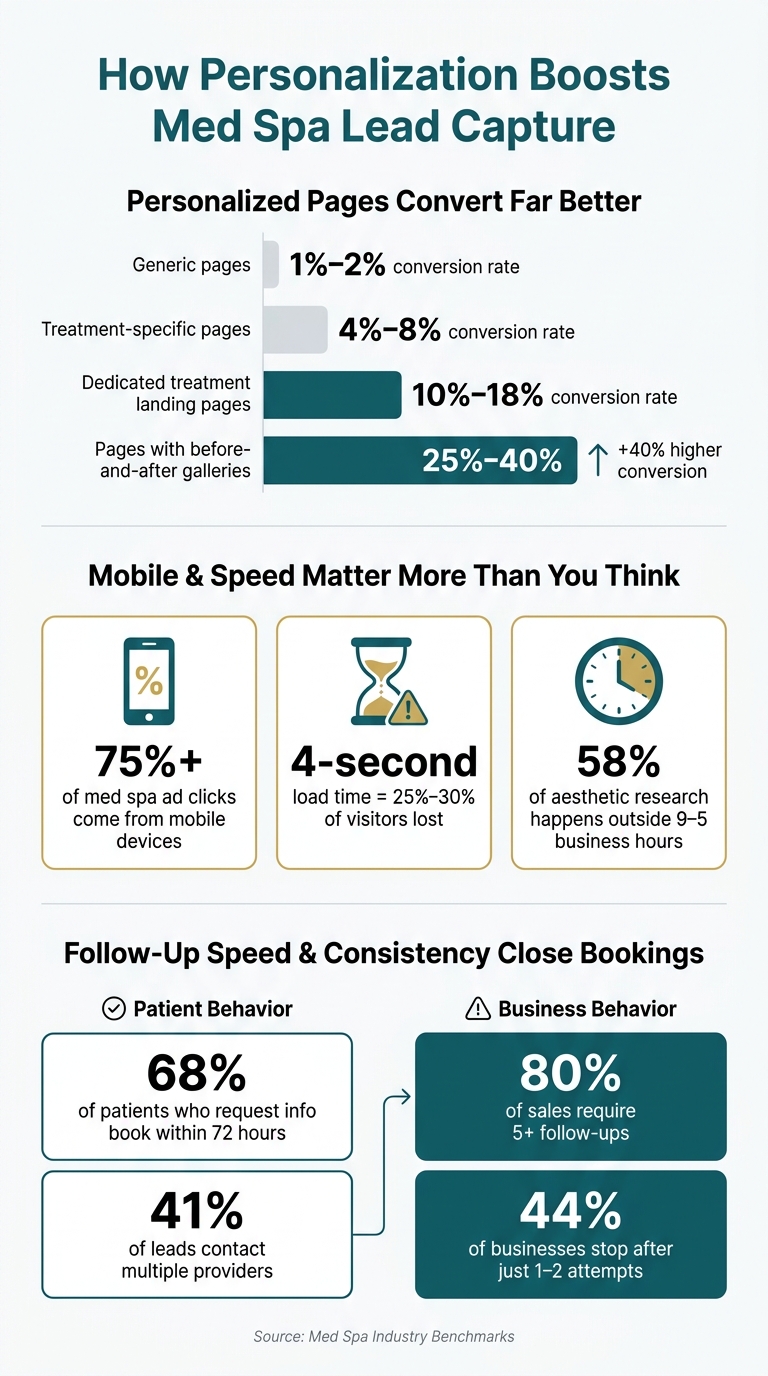
- Generic pages often convert at 1% to 2%
- Treatment pages can convert at 4% to 8%
- Dedicated treatment landing pages can hit 10% to 18%
- Pages with before-and-after galleries can convert 25% to 40% better
- More than 75% of med spa ad clicks come from mobile
- 68% of patients who request info book within 72 hours
If I wanted more consult requests, I’d focus on four things:
- Collect less data upfront: name, email, phone, treatment interest, ZIP code
- Match the page to intent: Botox visitors should land on a Botox page, not a general services page
- Use follow-up that fits the lead: price-focused leads need pricing and payment info; early-stage leads need education
- Track what turns into bookings with lead management: not just leads, but consults, treatments, and cost per lead
The main idea is simple: when the page, form, and follow-up match what the visitor wants, it gets easier for them to book.
That’s what this article explains, step by step, without the fluff.
Med Spa Personalization: Key Stats That Drive More Bookings
Step 1: Build the data and compliance foundation
Personalization starts with clean data and compliant storage. If this part is messy, everything that comes after gets harder. This data layer is what makes later personalization and follow-up work.
Collect the right visitor signals without overcomplicating forms
The goal isn't to collect everything. It's to collect the details that help you guide the next step.
For most med spas, that usually means:
- Name
- Phone number
- Treatment interest
- ZIP code
If you want to text leads, add a separate checkbox for SMS opt-in.
Keep forms short. That part matters more than a lot of teams think. Lead forms that ask for name, email, phone, and service interest see a 15% to 25% completion rate, while embedded booking calendars only see 8% to 14% completion. Add too many fields, and completion drops. Simple as that.
You also don't need to ask for everything by hand. Let your analytics and CRM pick up page views, traffic source, and time on page on their own.
Store lead data so it can drive later personalization
Store leads in one CRM with tags and custom fields. Treatment interest, lead source, and booking readiness can all shape the CTA and follow-up that each person sees. That way, each lead moves into the right sequence without your team sorting things manually.
A single system makes a big difference here. Prospyr keeps lead capture, CRM, scheduling, and analytics in one HIPAA-compliant system. That setup lets each lead move into the right page, form, or follow-up without manual work.
Handle consent, SMS opt-ins, and HIPAA-related workflows
Every form that collects a phone number needs a clear, explicit SMS opt-in. That's a TCPA requirement, and ignoring it can create real legal risk.
Email has its own rules too. Every marketing message must include:
- A physical mailing address
- A working unsubscribe link
Under CAN-SPAM, unsubscribes need to be processed right away, or within 10 business days at the latest.
For HIPAA, make sure every vendor that touches patient data has a signed Business Associate Agreement (BAA) in place. Also keep marketing lists separate from clinical records. This is where med spas often slip up, especially with tracking pixels. Use server-side conversion tracking with PII filtering on sensitive pages.
Safe consent handling protects the forms that make personalization possible.
sbb-itb-02f5876
Reading about the problem? See how Prospyr solves it in one platform.
Book a DemoStep 2: Personalize the Website Experience to Capture More Leads
Once your data setup is in place, the next step is simple: make the site do more work for each visitor. The biggest gains usually come from small, targeted changes to pages people already visit.
Match Page Messaging and CTAs to Treatment Intent
One of the biggest mistakes med spas make is sending everyone to the same generic Services page. A better move is to build separate pages for each treatment. A page built around Botox, laser hair removal, body contouring, or weight loss converts at 10% to 18%, while a standard homepage usually lands at just 2% to 4%.
Your hero section has to answer one thing almost instantly: Am I in the right place? Give visitors the treatment name, a one-line outcome promise, and one clear CTA. That's it. No clutter. No mixed signals. Use headlines like "Get Natural-Looking Botox Results in [City]" instead of a broad welcome message.
Right under that, add a trust bar. This is where Google review stars, board certifications, and "X treatments performed" stats help calm doubt. After that, let the before-and-after gallery do the selling. Pages with galleries convert 25% to 40% higher than pages without them.
Price matters too. Even a basic "starting at $X" can remove a big point of hesitation. Leave pricing out, and your conversion rate can drop by half. For lower-friction treatments like Botox or facials, use a live calendar so people can book on the spot. For higher-consideration services like body contouring, a short lead form gives your team room to tailor the follow-up.
Use Smart Forms, Popups, and Quizzes to Reduce Friction
Forms are where a lot of leads quietly disappear. Every extra field can cost you about 5% to 10% in conversions. So keep it short.
Use:
- short forms for people ready to act
- quizzes for people still sorting through options
- live booking for high-intent visitors who are close to saying yes
Conditional logic can help, but only when the extra question improves lead quality without slowing people down. The aim is to catch intent with as few fields as possible.
Adjust Experiences by Location and Device
Mobile is not a side case here. It is the main event. More than 75% of med spa ad clicks come from mobile devices, so your mobile experience has to be tight. Digital intake forms should have large input fields, dropdowns instead of open text boxes, and autofill turned on. If your mobile page takes 4 seconds to load, you can lose 25% to 30% of visitors before they even see the offer.
Location cues matter too. If someone is searching in a specific city, reflect that in the headline with something like "Botox in [City]." That small shift helps the page feel like a match.
On mobile, a sticky tap-to-call or tap-to-text button fixed at the bottom of the screen gives visitors the fastest path to reach out. That's not just a nice touch. It's a direct conversion lever. Those actions should then trigger the email and SMS follow-up covered in the next step.
Step 3: Turn Personalized Leads into Booked Consultations with Automation
Getting a lead is just the beginning. What happens next is what moves someone from “just looking” to actually booking.
The key is to use each person’s treatment interest, urgency, and budget range to shape the follow-up. In plain English: segment the lead, time the outreach well, and move them into scheduling without making your front desk do everything by hand.
Segment Leads by Service Interest and Purchase Intent
Not every lead should get the same message.
Someone who searched “Botox cost” and visited your pricing page three times is much closer to booking than someone who downloaded a skin rejuvenation guide and left. They’re in different mindsets, so the follow-up should reflect that.
A simple way to handle this is to tag leads by:
- Service category: Injectables, Skin, Body, or Wellness
- Purchase intent: high-intent or early-stage
High-intent leads need fast outreach. Early-stage leads usually need more education before you ask for the booking. And timing matters a lot here: 68% of patients who request information book within 72 hours, and 41% contact multiple providers.
Those tags should drive what happens next, including the next email, the next SMS, and the offer they see.
Build Email and SMS Sequences Based on Lead Behavior
Once a lead is tagged, automation should take over.
A solid flow might look like this: an immediate SMS confirmation, a treatment-specific email within 24 hours, a booking reminder on day 3, and a short social-proof SMS on day 5. It’s simple, but that kind of steady follow-up keeps the conversation alive.
You should also match the message to how the lead came in. If someone is price-sensitive, like a person who searched “Botox cost” or clicked your Specials page, bring up payment plan options early. That removes friction before it grows.
For higher-consideration services like body contouring or full facial balancing packages, a $99 consultation fee can help qualify intent without feeling transactional. Treatments in the $300–$500 range can also be framed with clear payment options when affordability is likely to matter.
There’s a big gap here that many practices miss: 80% of sales require five or more follow-ups, yet 44% of businesses stop after one or two attempts. That’s a huge drop-off. Staying consistent, without sounding pushy, helps your practice stay top of mind while the lead is still weighing options.
Use Integrated Tools to Automate Follow-Up and Handoff
Front-desk teams already have a lot on their plate. Add after-hours inquiries to the mix, and it’s easy for leads to go cold before anyone replies.
That matters because 58% of aesthetic treatment research happens outside standard 9–5 business hours. So a big share of your leads is coming in when no one is at the desk to answer questions or book the consult.
Prospyr's AI conversation agent can engage new leads right away by answering treatment questions, pre-qualifying budget range, and booking consultations, without staff needing to be online. Because Prospyr connects lead capture, CRM, email and SMS, automation, and scheduling in one HIPAA-compliant platform, each lead’s treatment interest and purchase intent stays connected across every touchpoint.
Track which segments and sequences turn into bookings before you scale them in Step 4.
Step 4: Measure Results and Roll Out Personalization in Phases
Once follow-up is live, track which pages and workflows lead to bookings. Then put more effort ONLY into the parts that improve results.
Track Conversion Rate, Lead Quality, and Cost Per Lead
Use the tags and workflows from Step 3 to see which treatment pages and follow-up sequences are turning into consultations.
Start with four core numbers: visitor-to-lead conversion rate, lead-to-consultation rate, consult-to-treatment rate, and cost per lead (CPL). Taken together, these show whether personalization is moving people closer to booking.
Benchmarks change by traffic source. Organic search often converts at 6–12%, paid search at 5–10%, paid social at 4–8%, and email or SMS traffic at 8–18%.
It also helps to follow tagged segments from first visit to lead, then to consult, then to treatment. Lead volume matters, but it’s only part of the picture. You also want to watch client acquisition cost (CAC) and lifetime value (LTV). Done well, personalization can cut CAC by up to 50% and increase revenue by 5–15%.
Prospyr's med spa software can help you see lead capture, CRM, and scheduling data in one place. That makes it easier to tie each metric back to consultation bookings and treatment revenue.
Run Simple A/B Tests on Headlines, Forms, and Pricing
Once you know where leads are dropping off, test the weakest step first.
Keep it simple. Test one variable at a time, such as the headline, form length, or pricing display. A smart place to start is a high-intent page: compare a treatment-specific headline with a generic one and see which version gets more people to act.
Early tests should focus on a few areas that tend to matter most:
- Pricing transparency: adding "starting at $X" beats hiding pricing in 8 out of 10 A/B tests
- Form length: shorter forms often reduce friction
- Real before-and-after photos versus lifestyle imagery: before-and-after galleries win 7 out of 10 times
Use Microsoft Clarity to see where visitors drop off before choosing your next test.
Conclusion: Start with One High-Intent Page and One Follow-Up Workflow
Personalization works best when you build it layer by layer. Gather the right data, tailor the pages that matter most, automate follow-up that fits the visitor’s interest, and keep an eye on lead quality over time.
Start with one high-intent page and connect it to one follow-up workflow. Review results after 30 days, then expand the parts that prove they can book more consultations.
FAQs
How do I personalize my med spa site without making forms too long?
Keep forms short. Ask only for the basics: name, email, phone number, and treatment interest. Every extra field adds friction, and that can lead to fewer conversions.
Multi-step forms can help a lot here. Instead of showing everything at once, they break the process into smaller parts that feel easier to finish. Pair that with conditional logic, and you can ask follow-up questions only when they make sense.
You can also make the form feel more personal without adding work for the user. A short video or a few before-and-after photos can do that nicely. They add context and help the experience feel warmer, not longer.
Which pages should I personalize first to get more consult requests?
Start with treatment-specific landing pages. They match what potential clients are searching for and are built to turn visits into consultation requests.
Focus on pages for major treatments. Add trust signals like reviews and provider credentials. If you serve more than one area, use localized content so each page speaks to that audience. Then test headlines, images, and CTAs to improve results.
How quickly should I follow up with new med spa leads?
Follow up with new med spa leads within 5 minutes whenever possible. According to Prospyr, replying in that window can increase conversion chances by up to 391%, with responses within 1 minute being especially effective.
Once you wait more than 5 minutes, engagement can drop off fast. That’s why quick follow-up matters so much.