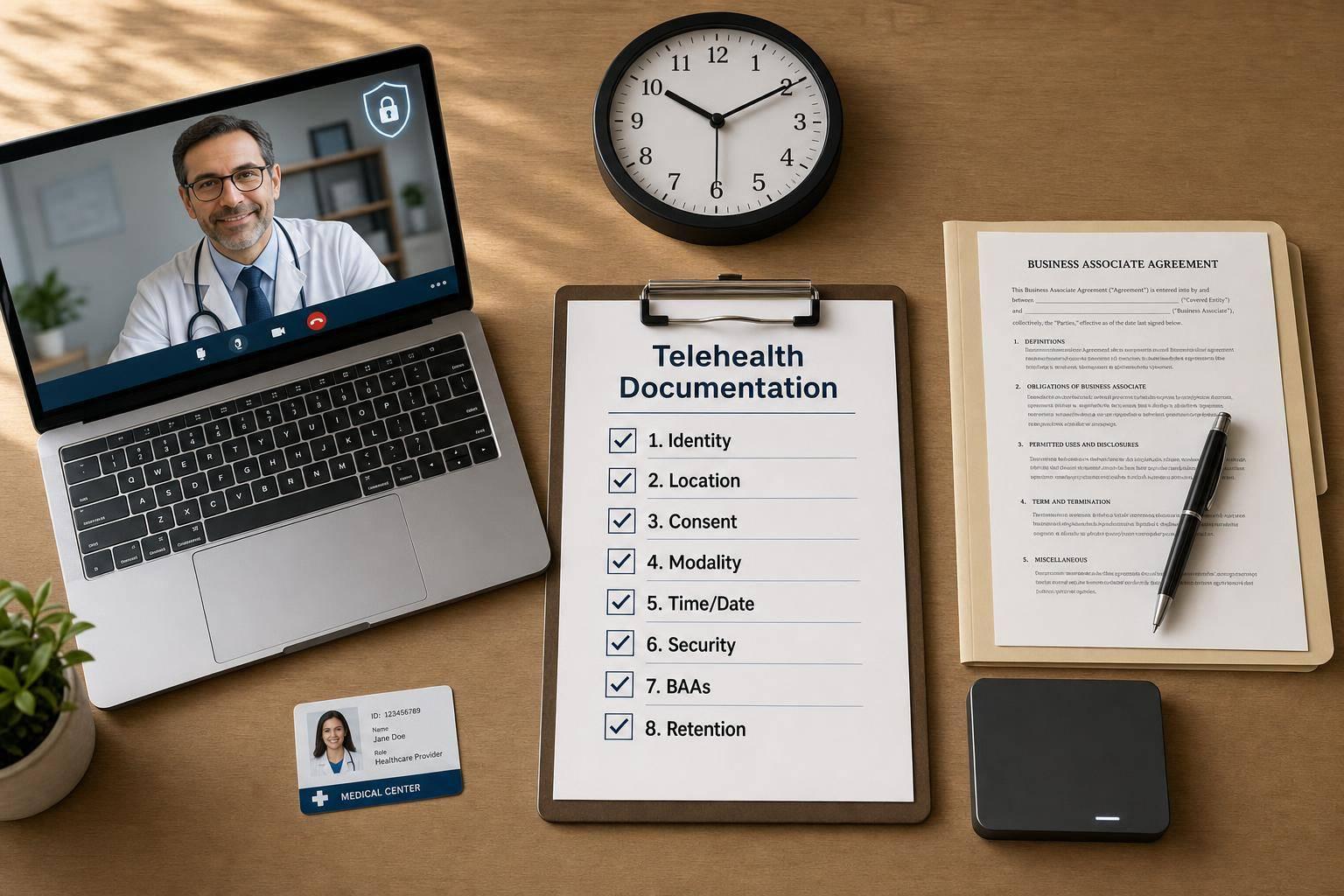

If your telehealth note does not show identity, location, consent, modality, time, and privacy steps, you can have a HIPAA problem, a billing problem, or both.
Here’s the short version: HIPAA applies to telehealth the same way it applies to in-person care. That means your records must protect PHI, limit access, and support patient rights. On top of that, your note also has to support payer rules and state record laws.
If I were turning this article into a simple checklist, I’d focus on these points first:
- Use HIPAA-ready tools only and get a BAA from each vendor that handles PHI
- Document who the patient is via digital intake, how identity was checked, and where the patient was located
- Record telehealth consent, visit format, platform used, and anyone else in the room
- Note exam limits and label any patient-reported vitals
- Add start time, stop time, total minutes, and any tech issues for billing support
- Protect records with encryption, MFA, role-based access, and audit logs
- Follow retention and patient access rules, including the HIPAA 6-year minimum for some compliance records
- Treat recordings with extra care since they create more PHI and more storage risk
A few facts stand out. HIPAA breach notices often must go out within 60 days. Compliance files like policies, risk analyses, and BAAs must be kept for at least 6 years under HIPAA. And if you record telehealth sessions, those files can become part of the medical record and create more storage and access duties.
This article boils down to one idea: a telehealth note must show both clinical care and privacy compliance in plain terms.
The HIPAA Framework for Telehealth Records
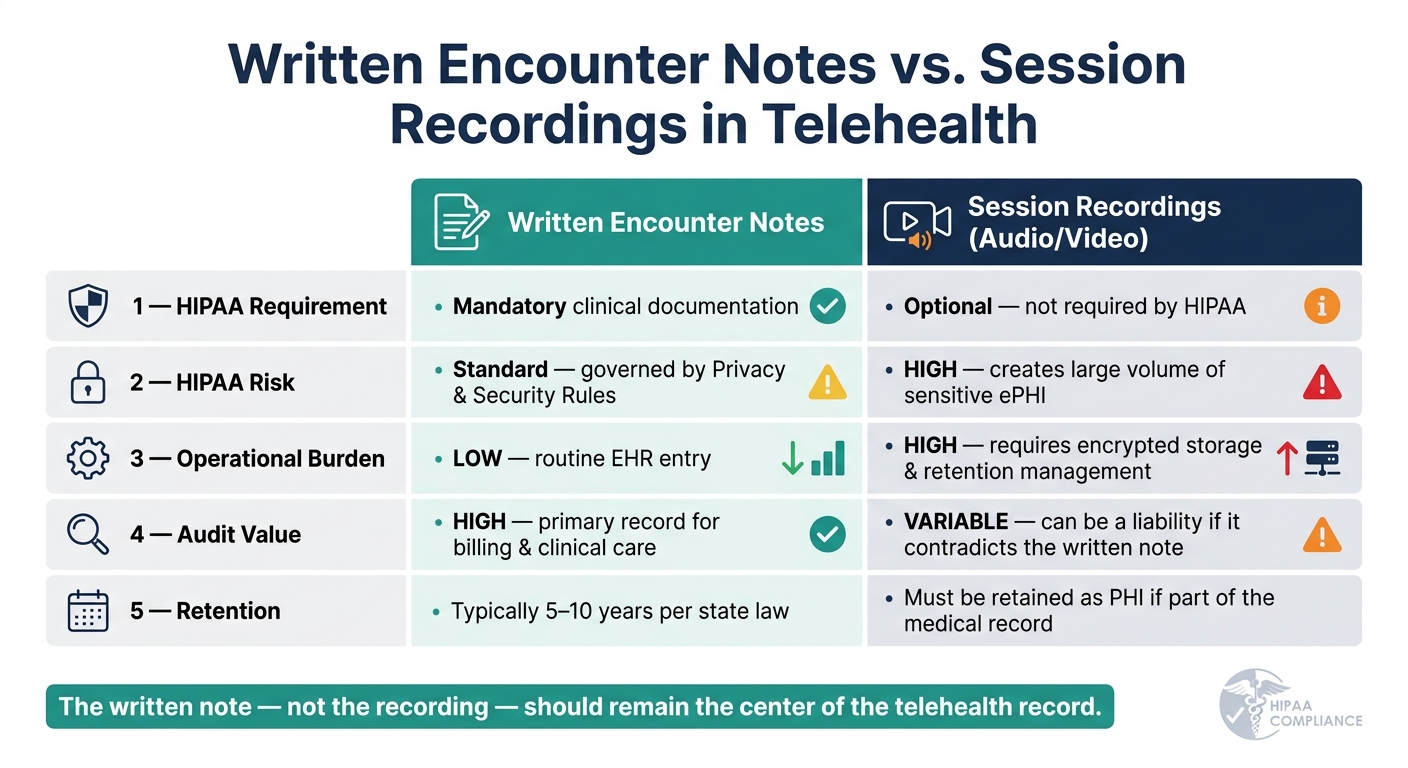
Written Notes vs. Session Recordings: HIPAA Telehealth Documentation Comparison
Privacy, Security, and Breach Notification Rules in Telehealth
Three HIPAA rules shape how telehealth records are created, stored, and shared. In plain English, they set the rules for who can see telehealth records and what needs protection.
The Privacy Rule covers how PHI can be used and disclosed. That means using only the PHI each person needs, checking identity at the start of the visit, and holding sessions in private settings.
The Security Rule requires strong safeguards for ePHI. In telehealth, that includes encryption and MFA on telehealth systems and clinician accounts.
The Breach Notification Rule kicks in when ePHI is exposed. If that happens, affected patients and HHS must be notified within 60 days. In telehealth, common breach scenarios include unauthorized session access or an exposed recording.
Covered Entities, Business Associates, and BAAs
Your practice is the covered entity, which means the final responsibility for HIPAA compliance sits with you. Any vendor that creates, receives, maintains, or transmits ePHI on your behalf is a business associate and must have a BAA.
In telehealth, that vendor list is often longer than people expect. It can include:
- Your video platform
- Your cloud storage provider
- Your AI scribe or transcription tool
- Any portal that handles patient messages or images
Consumer video apps do not offer BAAs and are not appropriate for telehealth involving PHI.
A simple safeguard is to verify BAAs each year. Vendor sub-processor lists and AI data-flow disclosures can shift over time, so a BAA signed years ago may not match the way the vendor handles data now. If a vendor refuses to sign a BAA or says it is not subject to HIPAA, do not use it for telehealth involving PHI.
Once the platform is under control, the next issue is the telehealth note itself and what it needs to include.
Written Notes vs. Audio or Video Recordings
HIPAA does not require telehealth recording. If you do record a session, that file becomes PHI and must be protected and retained as part of the record when it is clinically relevant.
That detail matters. If a recording is used to make clinical decisions, it can become part of the designated record set. At that point, storage, access, and breach-management duties grow well beyond what comes with a standard text note.
| Feature | Written Encounter Notes | Session Recordings (Audio/Video) |
|---|---|---|
| HIPAA Requirement | Mandatory clinical documentation | Optional; not required by HIPAA |
| HIPAA Risk | Standard; governed by Privacy/Security Rules | High; creates a large volume of sensitive ePHI |
| Operational Burden | Low; routine EHR entry | High; requires encrypted storage and retention management |
| Audit Value | High; primary record for billing and clinical care | Variable; can be a liability if it contradicts the written note |
| Retention | Typically 5–10 years per state law | Must be retained as PHI if part of the medical record |
That’s why the written note, not the recording, should stay at the center of the telehealth record.
sbb-itb-02f5876
What to Include in a HIPAA-Compliant Telehealth Note
Once the platform is secure, the note needs to show who was seen, where they were, and under what conditions.
Patient Identity, Location, Consent, and Visit Format
Start with the basic facts that confirm the right patient was seen in the right place. Include the patient's full name, date of birth, and medical record number. Verify identity with two identifiers or a photo ID, and note how that check was done.
Record the patient's current address and state, along with the provider's location, since both matter for licensure and POS coding. Document informed consent, how it was obtained, and the patient's understanding of telehealth risks, privacy limits, and the right to withdraw. If a guardian or representative took part, include that person's name and relationship. You should also state the modality and platform used.
Those details set up the rest of the clinical note.
Clinical Findings, Exam Limits, and Follow-Up Plan
The core of the note stays familiar. Include the chief complaint, history, medications, allergies, and assessment. The main shift is in how the physical exam is documented.
Write down what you could observe and what you could not. If the patient gave their own vital signs, label them as patient-provided vitals. If a hands-on exam could not be done, say so plainly.
List everyone present during the visit, including family members, caregivers, interpreters, or chaperones. Then close with a clear assessment, the medical decision-making rationale, any tests, referrals, or prescriptions, return precautions, and the follow-up plan. If telehealth was not enough for a full evaluation, document the clinical reason for switching to an in-person visit.
The next piece is time and coding support for the claim.
Time, Coding Support, and Audit-Ready Documentation
For time-based billing, include the date of service, start time, stop time, and total minutes of billable activity. If there was a tech interruption, document it along with the fallback steps that were taken.
The modality should line up with the coding and the note:
| Element | Synchronous (Audio-Video) | Audio-Only (Telephone) | Asynchronous (Store-and-Forward) |
|---|---|---|---|
| Modifier | 95 | 93 | GQ |
| POS Code | 02 (Other) or 10 (Home) | 02 (Other) or 10 (Home) | Varies by payer |
| Key Requirement | Real-time interactive video | Document why video was not used | Review of recorded data/images |
| Documentation | Modality, platform, location | Clinical appropriateness for audio | Time spent, artifacts reviewed |
For audio-only visits, make sure the note explains why video was not used.
After the note is done, storage and access controls decide whether it remains compliant.
Security, Retention, and Daily Workflow Controls
Once a note is finished, compliance comes down to what happens next: how the record is stored, who can get into it, and how long it stays available.
Secure Creation, Transmission, and Access to Telehealth Records
Every telehealth record contains PHI from the moment it is created. So encryption isn't optional. Use TLS 1.2 or higher for data in transit and AES-256 or equivalent for data at rest, whether the note is written in the clinic or from a remote setting. These safeguards do more than protect data. They also help keep records ready for audit.
Remote charting brings extra risk. Providers working from home should use dedicated clinical devices with full-disk encryption and auto-lock. They should also stay off public Wi-Fi and use headsets plus screen-privacy filters to reduce accidental disclosure. Shared family computers are off-limits.
Access controls matter just as much. Role-based access control (RBAC) limits who can view or edit telehealth records based on job duties. Multifactor authentication (MFA) and automatic logoff help close common access gaps. Systems should also keep audit logs showing who accessed, edited, or exported documentation, including session recordings and message threads. Stick to HIPAA-aligned telehealth tools and workflows.
These controls protect the record itself. Retention rules decide how long that record must stay available.
Record Retention, Patient Access, and Amendment Rights
HIPAA requires at least six years of retention for certain compliance documents, including risk analyses, policies, consent forms, and BAAs. That's the federal minimum, not the limit. Many states require longer retention periods for clinical telehealth records and recordings.
Retention and access rights go hand in hand. Patients have the right to access their telehealth records and request amendments. Those records should be delivered through secure channels, such as a HIPAA-compliant patient portal or encrypted electronic transmission.
Session recordings should be created only when there is a clear clinical or legal reason. Get explicit consent before recording, and store those files in encrypted systems covered by a signed BAA.
Standard workflows help teams handle these rights and retention duties the same way every time.
Workflows, Staff Roles, and Internal Audits
Standard workflows are one of the easiest ways to keep telehealth documentation consistent across a team. EHR templates that require patient location, modality, and consent status before a note can be finalized help cut down on missed details. Intake checklists and approved-device policies also give staff a clear process to follow.
The table below shows each role and its main responsibilities during a telehealth encounter. Clear role assignment helps prevent missed documentation and weak access control.
| Role | Key Responsibilities |
|---|---|
| Front Desk / Admin | Capture telehealth consent, verify insurance eligibility, confirm patient location, and send secure meeting links |
| Clinical Staff / MAs | Perform identity checks (2 identifiers) and verify private environment before the visit begins |
| Providers | Complete and sign clinical notes, document exam limitations and modality, provide coding support |
| Privacy / Security Officer | Manage BAAs, conduct annual risk assessments, review audit logs, lead workforce training |
| IT / Security | Enforce MFA and device encryption, monitor for unauthorized access, maintain platform security |
A formal Security Risk Assessment (SRA) should be completed at least once a year, or any time a new platform or workflow is introduced. That review should look closely at telehealth platforms, clinician home networks, and remote device security. Vendor vetting should also be part of regular compliance checks so telehealth documentation stays consistent and compliant across every visit.
Prospyr can centralize EMR, digital intake, and AI note creation in one HIPAA-compliant workflow.
Putting HIPAA-Compliant Telehealth Documentation into Practice
How a Connected Platform Can Support Compliant Documentation
Once your workflow controls are set, the next job is simple in theory and hard in practice: make them happen in every single visit. That’s where many teams hit friction. Manual telehealth documentation can drift from one provider to the next, especially in busy clinics. A HIPAA-compliant platform helps keep those steps consistent instead of leaving them to memory.
Prospyr is built for aesthetics and wellness clinics. It brings digital intake forms and AI note creation together with provider review in one place. That means digital intake can collect telehealth consent before the provider joins the session. Then AI-assisted notes can prompt for the platform, modality, and patient location, helping teams cover patient identity, location, consent, modality, and exam limits before sign-off. In a high-volume practice, that can save time and make documentation more consistent.
Key Takeaways for U.S. Aesthetic and Wellness Practices
Telehealth documentation carries the same legal and clinical weight as an in-person chart. The setting may change, but the record still matters just as much. A few principles apply to every visit:
- Document telehealth-specific details every time: patient location, modality, platform, and consent status.
- Protect ePHI at every step: encryption, MFA, role-based access, and signed BAAs with every vendor.
- Use standardized templates and e-signatures: capture identity verification, location, consent, modality, participants, and exam limitations in a consistent way.
- Align retention and access workflows with both HIPAA and state law: the federal six-year minimum is a floor.
Consistency comes from templates, trained staff, and one compliant workflow.
FAQs
Do telehealth notes need anything beyond standard charting?
Yes. Along with standard clinical charting, telehealth notes should include visit-specific details needed for compliance and reimbursement.
Document the patient’s and provider’s locations, the telehealth modality used, start and stop times if billing is time-based, patient consent, and that the communication channel was secure and the session private.
When does a telehealth recording become part of the medical record?
A telehealth recording becomes part of the medical record when it’s stored as protected health information in a HIPAA-compliant system.
If a provider records a session, the file must be encrypted at rest and stored under the organization’s privacy and security policies. Since it contains patient data, it’s subject to the same rules as other medical records for access, audit trails, and amendment rights.
What if my telehealth vendor will not sign a BAA?
If your telehealth vendor won’t sign a Business Associate Agreement (BAA), you can’t legally use that platform for sessions that involve Protected Health Information (PHI).
Here’s the plain-English version: HIPAA requires a signed BAA with any vendor that creates, receives, maintains, or transmits PHI on your behalf. No signed agreement means you need to stop using that service and move to one that will sign.