
v1.7.68
This release fixes a long-standing issue with double-spacing in appointment confirmation emails and introduces a rich text editor for composing email messages. A few smaller improvements to conversations and the sidebar round out the update.
v1.7.68
Released on April 28, 2026
This release fixes a long-standing issue with double-spacing in appointment confirmation emails and introduces a rich text editor for composing email messages. A few smaller improvements to conversations and the sidebar round out the update.
Highlights
-
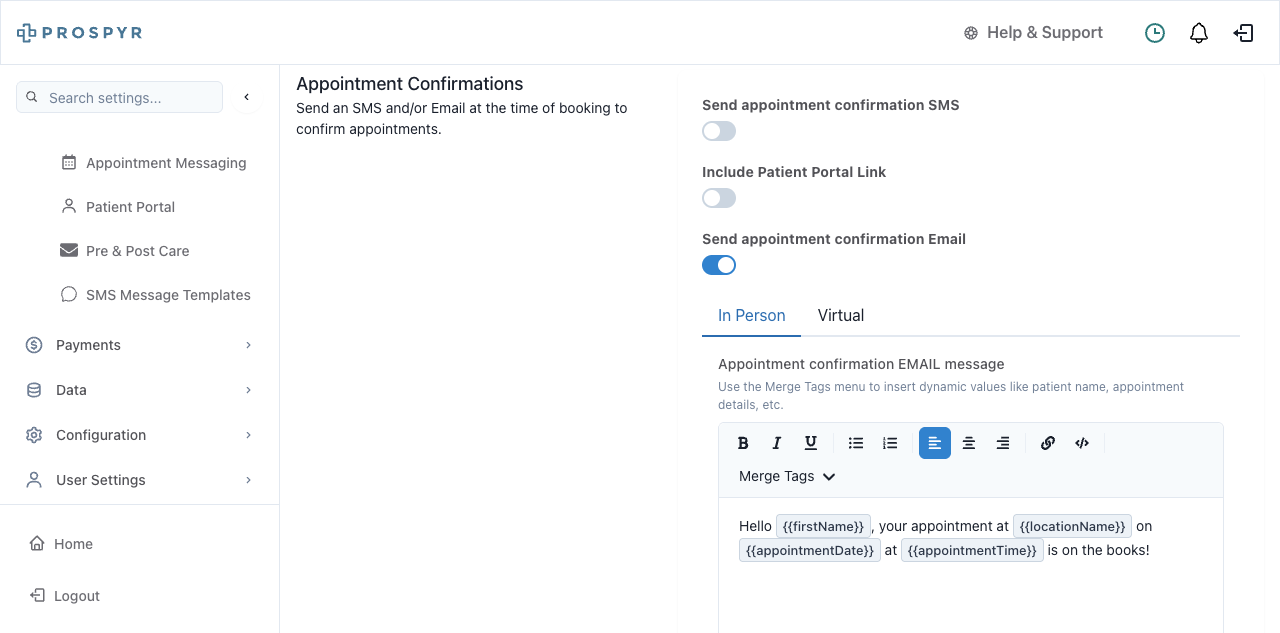
UI UpdateRich Text Email Editor Appointment confirmation emails now look exactly the way you write them. A new formatting toolbar replaces the plain text box in your email settings, giving you full control over bold, italic, bullet lists, alignment, and dynamic patient details like first name and appointment date.
- Find the new editor under your email settings for appointment confirmations — both in-person and virtual
- Insert merge tags like ‘First Name’ or ‘Appointment Date’ as labeled chips directly in your message, no more typing placeholders manually
- Formatting like bold, italics, and bullet points will now appear correctly in the emails patients receive
Improvements
- Confirmation Email Spacing Fixed Appointment confirmation emails sent to patients no longer have awkward double-spacing between every line. What you write in your email settings is now what patients actually see.
- Emails will now match the formatting you configure — no extra blank lines between lines of text
- Existing email content has been automatically converted so nothing needs to be rewritten
- This applies to all appointment confirmation emails sent going forward
- Archived Conversations Show in Patient Search When you search for a patient in the Conversations page, archived conversations now show up in the results — so you won’t miss older message threads.
- Search for any patient in the Conversations inbox and see their full history, including archived threads
- No more switching views or hunting for past conversations manually
- Helps staff quickly reference prior communication without extra steps
Bug Fixes
- Scheduled Message Display Cleaned Up Scheduled messages in the Conversations view no longer show extra unnecessary fields, making the message preview cleaner and easier to read.
- Scheduled messages now display only the relevant information
- Visible in the Conversations inbox when reviewing pending scheduled messages