
v1.7.74
This release brings improvements to patient wallet refunds, Google Reviews visibility, PatientFi compliance, coupon management, and the online booking waitlist experience.
v1.7.74
Released on April 30, 2026
This release brings improvements to patient wallet refunds, Google Reviews visibility, PatientFi compliance, coupon management, and the online booking waitlist experience.
Highlights
- Refunds to Patient Wallet Now Work Reliably Staff can now refund payments to a patient’s wallet without hitting a confusing error message — even for older or certain checkout payments that previously caused the refund modal to close with a cryptic error.
- The ‘Patient ID Missing’ error that blocked wallet refunds on certain invoices is resolved
- Refunds to patient wallets now complete successfully and the transaction appears correctly in the patient’s activity history
- If a payment truly can’t be refunded to a wallet, staff will now see a clear, actionable message explaining why and suggesting a different refund destination
New Features
-
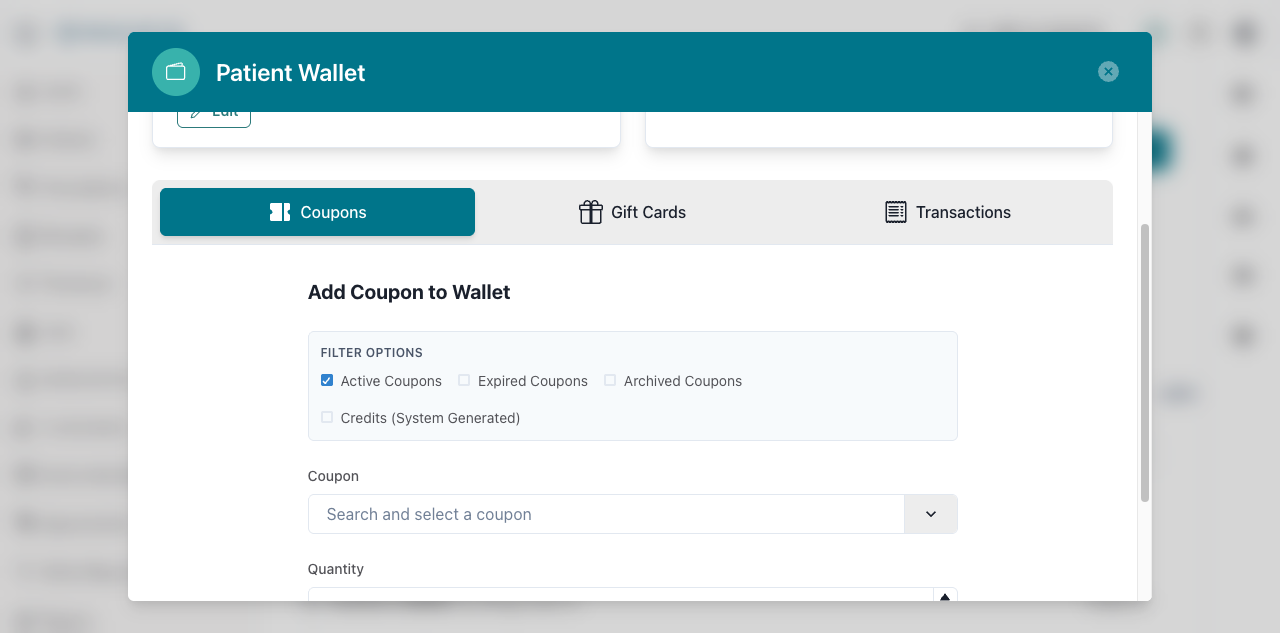
UI UpdateAdd Coupons from Patient Wallet You can now add coupons directly to a patient’s wallet from within the Patient Balances section, making it faster to apply promotions and rewards at the point of care.
- A new ‘Add Coupon’ option appears in the Patient Balances widget on a patient’s profile
- Search and filter available coupons, then choose the quantity to add to the patient’s wallet
- The coupon list automatically refreshes when filter criteria change, so staff always see the most relevant options
Improvements
- UI UpdatePatientFi Presence Confirmation Step Before handing a device to a patient to start a PatientFi financing flow, providers are now prompted to confirm the patient is physically present — keeping your practice aligned with PatientFi compliance requirements.
- A confirmation prompt now appears when a provider taps ‘Apply for Financing’ or opens a PatientFi payment link on the provider app
- The prompt reads: ‘The patient must be present and view all screens on this device’ — providers simply tap Continue to proceed
- This step only appears for in-office, provider-initiated flows; sending a financing link by text or email is unaffected
- Google Reviews Showing in Online Reputation Tab Google Reviews are now populating correctly in the Online Reputation tab, so you can monitor and respond to patient feedback without missing reviews.
- Reviews that were previously not appearing in the Online Reputation tab will now show up as expected
- Find your reviews under the Online Reputation section of your dashboard
- UI UpdateClearer Waitlist Login Prompt in Booking Patients trying to join a waitlist through your online booking page now see a clearer, more helpful message when they need to log in first — reducing confusion and drop-off during the booking process.
- The login prompt patients see on the waitlist page has been updated to be easier to understand
- This applies to your online booking page’s time-selection and waitlist screens
- Patients are less likely to abandon the waitlist signup due to unclear instructions
Bug Fixes
- Patient Wallet Refund Error Resolved Refunding a payment to a patient wallet no longer fails with a ‘Patient ID Missing’ error for certain older or anonymous payments.
- Previously, attempting to refund certain payments to a patient wallet would close the refund modal with an unhelpful error
- The refund now completes successfully and shows up correctly in the patient’s transaction history
- Affected practices (such as those using storefront or older invoices) can now process these refunds without contacting support